
Audio Data Conversion and Preprocessing Pipeline
Project Summary
This project involved developing an automated pipeline for processing, converting, and organizing audio data—primarily from, but not limited to, the Mozilla Common Voice dataset. An automatic speech recognition (ASR) model was being trained to support low-resource languages. In some cases, individual models were trained for each language, while in others, multilingual models were explored depending on data availability. My role involved gathering and preprocessing audio data from open-source sources across the internet. The goal was to transform diverse, often inconsistent audio files into a standardized format suitable for training these ASR systems. This included consistent dataset splitting and validation, with particular attention to machine-specific constraints. I have processed more than 3,000 hours of audio data and more than 30 languages.
Over several iterations, the pipeline was refined to address challenges related to scalability, file format compatibility, processing speed, and overall data organization.
The core objective was to convert raw audio data stored in .mp3 format into clean, uniformly formatted .wav files. The final output consisted of training-ready .tsv files designed for use in ASR model training pipelines built with PyTorch and Hugging Face’s datasets and transformers libraries. These .tsv files adhered to strict requirements: audio durations capped at 30 seconds, a consistent 16kHz sampling rate, standardized text formatting, and reproducible train/dev/test splits. This structure also accounted for technical constraints—at the time, the system could only process around 30,000 audio files at once, while some datasets contained hundreds of thousands of samples.
Initially, the project used a JSON-based approach for storing metadata. However, to better align with tools used by colleagues and ensure compatibility with downstream machine learning models, I transitioned to .tsv-based annotation, adopted .wav audio formatting, and implemented logic for filtering, validating, and parallel-processing large volumes of audio data.
Discussion of how datasets are stored
The majority of the data used in this project comes from Mozilla’s Common Voice program, as previously mentioned. A brief background of the data is provided to contextualize the code.
From the Common Voice website:
We’re building a multi-language, open-source voice dataset for training speech-enabled applications. Large, publicly available voice datasets will foster innovation and healthy competition in machine-learning speech technology. Common Voice’s dataset is the largest of its kind, but not the only one.
When downloading a language corpus, there are many folders and files provided. We ignored most files in corpora, but we paid particular attention to these:
validated.tsvcontains 11 columns of data of which only two are pertinent:pathandsentence. This file is meant for sentences that human speakers of the language deem to match the transcription sufficiently. This means that audio files deemed corrupted, or just noise by error, are not included and are in a different file so as to not be used mistakenly./Clipsfolder contains all the audio submitted to the Common Voice website.
Goals developed/ What was done
The core functionality developed in this project includes:
- Converting audio files from
.mp3to 16kHz mono-channel.wavformat - Excluding files longer than 30 seconds (due to training pipeline limits)
- Annotating metadata in
.tsvformat instead ofJSON - Splitting data into training, development, and test sets using a reproducible strategy
- Creating mini-batches or “packets” of data for scalability
- Parallelizing time-consuming processes using Python’s
ThreadPoolExecutor - Organizing a reproducible and modular codebase that handles malformed TSVs and missing columns
The initial approach involved a simple processing pipeline that would extract audio from a dataset, save it locally, and create a JSON file with metadata. However, as the project progressed, it became clear that more sophisticated handling was required to deal with format constraints, processing performance, and specific limitations in the target pipeline.
Challenges and Iterative Improvements
The first implementation was relatively straightforward:
- Initially used the soundfile Python library to write audio files from the dataset.
- Created a simple JSON metadata file containing file paths, transcriptions, and split assignments
- Applied basic random shuffling for dataset splitting (80% train, 10% dev, 10% test)
This approach was functional but limited in several ways. Pipeline code at this stage of the project:
- It lacked error handling for malformed data
- Format constraints weren’t well-defined
- Performance was suboptimal for large datasets
- The JSON format proved problematic for the target pipeline
validated_clips_folder = r'Datasets\Data\cv-corpus-19.0-2024-09-13\ha\validated_clips'

# Ensure the validated_clips folder exists
os.makedirs(validated_clips_folder, exist_ok=True)

try:
    # Load the JSON data
    with open(json_file_path, 'r', encoding='utf-8') as f:
        validated_json_data = json.load(f)

    # Extract the list of files from the JSON
    files_in_json = {entry['FILE_PATH'] for entry in validated_json_data}

    # Copy files from clips folder to validated_clips folder
    for file_name in files_in_json:
        source_file = os.path.join(clips_folder, file_name)
        destination_file = os.path.join(validated_clips_folder, file_name)

        # Check if the source file exists (in case of discrepancies)
        if os.path.exists(source_file):
            shutil.copy2(source_file, destination_file)
        else:
            print(f"File not found: {source_file}")

    print(f"Clips from the JSON file have been copied to: {validated_clips_folder}")

except FileNotFoundError as e:
    print(f"Error: {e}")

print(f"Validated clips folder created at: {os.path.abspath(validated_clips_folder)}")
This worked for a while, until the data needed to be integrated. At that point more data constraints became available and the code had to evolve.
Technical Implementation and Tools
Libraries and Tools Used
Core Data Processing:
pandas: For data manipulation and TSV file handlingnumpy: For random sampling and array operations
Audio Processing:
soundfile: Initially used for audio file writingpydub: For advanced audio conversion and resamplingmutagen: For audio metadata extraction, particularly duration detection
System and File Operations:
osandpathlib: For file path manipulation and directory operationsshutil: For file copying operations
Performance Optimization:
concurrent.futures: For parallel processing withThreadPoolExecutor
For ease of use
Stored in a Jupyter notebook, this file only requires the user to enter the language code—assuming Common Voice data, which follows a uniform structure.
# PATH OF VALIDATED.tsv
validated_tsv = 'validated.tsv'

# Code for Language
language_code = 'uz'
Reading .tsv
The implementation included creating a TSV reader function (read_tsv_with_missing_columns) that could handle malformed data by filling missing columns with empty strings—a common issue in crowdsourced datasets.
During development, I encountered a critical issue with how pandas handles malformed .tsv files. Pandas will silently fail to load data if it encounters rows with missing columns, which led to over 10,000 audio clips being unintentionally excluded from processing. This happened because Common Voice .tsv files contain 13 columns, but rows with missing values aren’t padded, and pandas.read_csv() doesn’t raise an error—it simply skips those rows.
I only discovered the discrepancy after comparing the number of processed audio files (around 190,000) to the expected total (219,000) based on the source directory. To address this, I implemented a workaround that reads .tsv files line by line, fills in any missing columns with empty strings, and then constructs the DataFrame manually. This ensures no rows are silently lost during preprocessing—a crucial safeguard when working with crowd-sourced datasets like Common Voice.
def read_tsv_with_missing_columns(tsv_path):
    """
    Reads a .tsv file line by line and handles missing columns by filling them with empty strings.
    """
    rows = []
    with open(tsv_path, 'r', encoding='utf-8') as file:
        # Read the header
        header = file.readline().strip().split('\t')
        total_lines = 0  # Counter for total lines (excluding header)
        for line in file:
            total_lines += 1  # Increment line counter
            # Split the line by tabs and handle missing columns
            row = line.strip().split('\t')
            if len(row) < len(header):
                # Fill missing columns with empty strings
                row.extend([''] * (len(header) - len(row)))
            rows.append(row)

    # Convert rows into a DataFrame
    df = pd.DataFrame(rows, columns=header)
    return df, total_lines
Addressing Audio Duration
A significant constraint discovered during development was that the pipeline could only process audio files under 30 seconds. This required:
- Creating functions to detect audio duration (
get_audio_duration) - Implementing a filtering system for long files (
find_long_audio_files) - Maintaining a record of excluded files to ensure they weren’t included in the final dataset
This limitation was addressed by creating a validation process that flagged and excluded audio exceeding this threshold, preventing system failures during training.
def get_audio_duration(file_path):
    ext = os.path.splitext(file_path)[1].lower()
    try:
        if ext == '.mp3':
            audio = MP3(file_path)
        else:
            return None
        return audio.info.length
    except Exception as e:
        print(f"Error processing {file_path}: {e}")
        return None

def process_audio_file(file_path, min_duration=30):
    duration = get_audio_duration(file_path)
    if duration and duration > min_duration:
        print(f"File: {file_path}, Duration: {duration:.2f} seconds")
        return file_path
    return None
What happens to longer audios?
The next section ensured that new audio wasn’t ignored. If the 30-second duration constraint is relaxed in the future, the audio should still be accessible. To support this, code was written to compare the number of .mp3 files to the number of path entries in the .tsv, and to verify that each file is under 30 seconds in duration.
get_validated_audio_files was then used to grab audio file from the actual relative location and the transcription to combine into a new .tsv
def get_validated_audio_files(tsv_path, folder_path):
    """
    Reads the .tsv file using `read_tsv_with_missing_columns` and filters for .mp3 files.
    """
    df, total_lines = read_tsv_with_missing_columns(tsv_path)

    # Ensure the 'path' column exists
    if 'path' not in df.columns:
        raise ValueError(f"The TSV file must contain a 'path' column.")

    # Filter for .mp3 files and construct full paths
    audio_files = df['path'].apply(lambda x: os.path.join(folder_path, x)).tolist()
    audio_files = [file for file in audio_files if file.endswith('.mp3')]

    print(f"Found {len(audio_files)} validated .mp3 files in the TSV (Total lines in file: {total_lines}).")
    return audio_files
find_long_audio_files was then used to comb through the clips to find anything over 30 seconds and move them to a new .tsv if any existed.
def find_long_audio_files(audio_files, min_duration=30):
    global long_audio_found

    print(f"Found {len(audio_files)} audio files to process.")

    long_files = []
    with ThreadPoolExecutor(max_workers=max(1, os.cpu_count() // 2)) as executor:
        futures = {executor.submit(process_audio_file, file_path, min_duration): file_path for file_path in audio_files}
        for future in as_completed(futures):
            result = future.result()
            if result:
                long_files.append(result)

    print(f"Found {len(long_files)} audio files longer than {min_duration} seconds.")

    if long_files:
        with open(LONG_AUDIO_FILE, "w") as f:
            f.write("\n".join(long_files) + "\n")
        print(f"List of long audio files saved to {LONG_AUDIO_FILE}")
        long_audio_found = True
        print(f"long_audio_found set to TRUE.")
    else:
        print("No audio files longer than 30 seconds found.")

# Running the code
if __name__ == "__main__":
    tsv_path = "validated.tsv"  # Path to the .tsv file
    folder_path = "clips"       # Folder where audio files are stored

    # Get the list of validated .mp3 files
    validated_audio_files = get_validated_audio_files(tsv_path, folder_path)

    # Process only the validated files
    find_long_audio_files(validated_audio_files)

Audio Conversion
The project transitioned to exclusively using WAV. This standardization was necessary because:
- The target pipeline had specific format requirements
- WAV files provide uncompressed audio data, ensuring no quality loss
- The 16kHz sample rate balanced audio quality with file size for speech recognition purposes
This leads to the next step in the process: the previously discussed read_tsv_with_missing_columns() function.
# Function to read and process the .tsv file while preserving all rows
def read_tsv_with_missing_columns(tsv_path):
    # Read the file line by line to handle malformed rows
    rows = []
    with open(tsv_path, 'r', encoding='utf-8') as file:
        # Read the header
        header = file.readline().strip().split('\t')
        total_lines = 0  # Counter for total lines (excluding header)
        for line in file:
            total_lines += 1  # Increment line counter
            # Split the line by tabs and handle missing columns
            row = line.strip().split('\t')
            if len(row) < len(header):
                # Fill missing columns with empty strings
                row.extend([''] * (len(header) - len(row)))
            rows.append(row)

    # Convert rows into a DataFrame
    df = pd.DataFrame(rows, columns=header)
    return df, total_lines
convert_to_wav uses AudioSegment to convert the .mp3 to .wav.
# Function to convert audio files to 16kHz WAV format
def convert_to_wav(input_file, output_file):
    try:
        # Load the audio file and convert it to 16kHz mono
        audio = AudioSegment.from_file(input_file)
        audio = audio.set_frame_rate(16000).set_channels(1)
        # Export the audio to WAV format
        audio.export(output_file, format="wav")
        return f"Finished converting and moving: {input_file}"
    except Exception as e:
        return f"Error converting {input_file}: {e}"
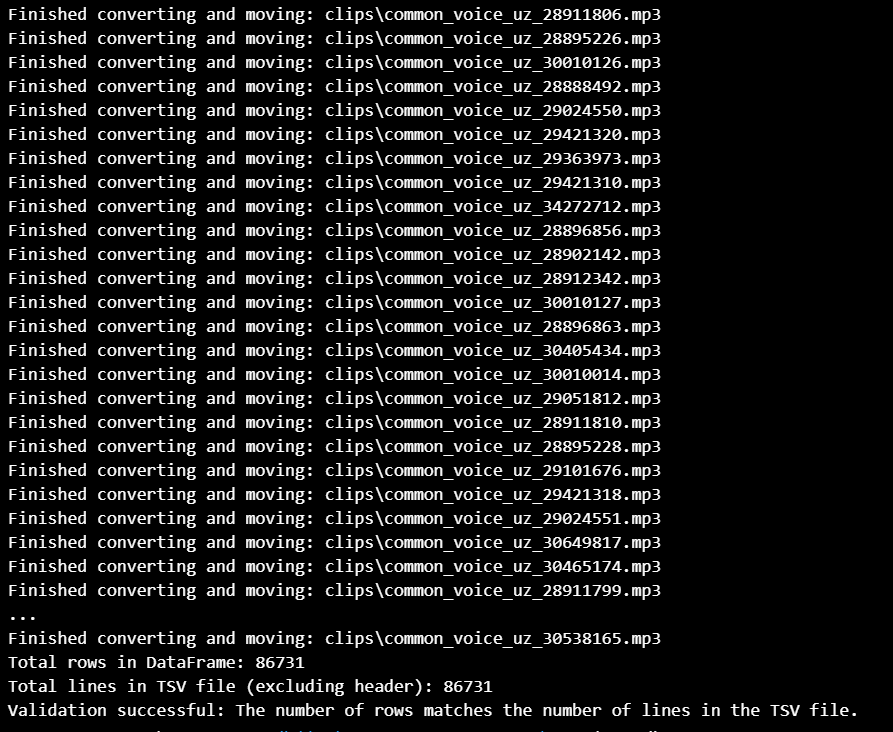
The next portion came out of the need for speed. Processing thousands of audio files sequentially took several hours. To reduce wait time, I implemented parallel audio conversion and file copying using ThreadPoolExecutor, which drastically reduced execution time. A limiter was also added max_workers = max(1, os.cpu_count() // 2) for sanity purposes as to not allocate too many resources to the process. There are also print() statements for testing and confirmation of data.
The penultimate portion, process_tsv(), puts it all together and creates the conversion then a .tsv that includes the file path adrress including folder for the new data format.
# Main processing function (INCREASE MAX_WORKERS FOR FASTER CONVERSION)
def process_tsv(tsv_path, audio_folder, output_folder, max_workers =  max(1, os.cpu_count() // 2)):
    # Read the .tsv file with the new logic and get the total line count
    data, total_lines = read_tsv_with_missing_columns(tsv_path)

    # Ensure the output folder exists
    os.makedirs(output_folder, exist_ok=True)

    # Create a ThreadPoolExecutor to parallelize the conversion tasks
    with ThreadPoolExecutor(max_workers= max_workers) as executor:
        # Submit tasks to the executor
        futures = []
        for index, row in data.iterrows():
            input_file = os.path.join(audio_folder, row['path'])
            output_file = os.path.join(output_folder, f"{os.path.splitext(row['path'])[0]}.wav")

            if os.path.exists(input_file):
                # Submit the conversion task to the executor
                future = executor.submit(convert_to_wav, input_file, output_file)
                futures.append(future)
            else:
                print(f"File not found: {input_file}")

        # Process the results as they complete
        for future in as_completed(futures):
            try:
                result = future.result()
                print(result)
            except Exception as e:
                print(f"Error during conversion: {e}")

    # Validate the number of rows processed
    print(f"Total rows in DataFrame: {len(data)}")
    print(f"Total lines in TSV file (excluding header): {total_lines}")

    if len(data) == total_lines:
        print("Validation successful: The number of rows matches the number of lines in the TSV file.")
    else:
        print("Validation failed: The number of rows does not match the number of lines in the TSV file.")


if __name__ == "__main__":
    # Define paths
    tsv_path = validated_tsv  # Path to your .tsv file
    audio_folder = "clips"  # Path to the folder containing audio files
    output_folder = f"validated_{language_code}_wav"  # Output folder for converted .wav files

    # Process the .tsv and convert files
    process_tsv(tsv_path, audio_folder, output_folder)
Bringing it all together
Finally, process_tsv_for_splits() now takes the validated.tsv and processes it with the splits needed for training, that is, 80% train, 10% dev, and 10% test.
# Function to process the TSV and create splits
def process_tsv_for_splits(tsv_path, output_folder):
    # Read the .tsv file with the row-preserving logic
    data, total_lines = read_tsv_with_missing_columns(tsv_path)

    # Ensure the required columns exist
    if 'path' not in data.columns or 'sentence' not in data.columns:
        raise ValueError("The TSV file must contain 'path' and 'sentence' columns.")

    # Extract only the 'path' and 'sentence' columns
    data = data[['path', 'sentence']]

    # Rename 'sentence' to 'text'
    data = data.rename(columns={'sentence': 'text'})

    # Modify the 'path' column: replace .mp3 with .wav, prepend the output folder, and use forward slashes
    data['path'] = data['path'].apply(
        lambda x: os.path.join(output_folder, os.path.splitext(x)[0] + '.wav').replace('\\', '/')
    )

    # Check if the flag is True and read the .txt file if it exists
    if long_audio_found:
        excluded_files = read_excluded_files(LONG_AUDIO_FILE)
        if excluded_files:
            print("Excluding files longer than 30 seconds from the TSV processing.")
            data = data[~data['path'].isin(excluded_files)]  # Exclude files in the excluded_files list
        else:
            print("No files to exclude: The .txt file is empty or does not exist.")
    else:
        print("No long audio files found. Proceeding without exclusions.")

    # Add a new 'split' column with 80/10/10 train/dev/test split
    np.random.seed(42)  # Set a seed for reproducibility
    split_proportions = [0.8, 0.1, 0.1]  # Train/Dev/Test proportions
    splits = np.random.choice(['train', 'dev', 'test'], size=len(data), p=split_proportions)
    data['split'] = splits

    # Export the modified DataFrame to a new .tsv file in the current directory
    output_tsv_path = f'{language_code}_validated_audio_splits.tsv'  # Save in the current directory
    data.to_csv(output_tsv_path, sep='\t', index=False)
    print(f"Exported new TSV file to: {os.path.abspath(output_tsv_path)}")

    # Validate the number of rows processed
    print(f"Total rows in DataFrame: {len(data)}")
    print(f"Total lines in TSV file (excluding header): {total_lines}")

    if len(data) == total_lines:
        print("Validation successful: The number of rows matches the number of lines in the TSV file.")
    else:
        print("Validation failed: The number of rows does not match the number of lines in the TSV file.")

def read_excluded_files(file_path):
    if not os.path.exists(file_path):
        print(f"File {file_path} does not exist.")
        return []

    with open(file_path, 'r', encoding='utf-8') as file:
        excluded_files = file.read().splitlines()
    return excluded_files


# Check paths here - rename output folder
if __name__ == "__main__":
    # Define paths
    tsv_path = validated_tsv  # Path to your .tsv file
    output_folder = f"validated_{language_code}_wavs"  # Folder where the .wav files are stored

    # Process the .tsv and export the new file
    process_tsv_for_splits(tsv_path, output_folder)

OPTIONALS: Packet Creation for Large Datasets
To handle extremely large datasets, a packet creation system was implemented:
- Created manageable 30,000 file chunks
- Maintained proper train/dev/test split ratios within each packet
- Ensured reproducibility with sequential random seeds
This approach allowed for more efficient processing and organization of large datasets while maintaining appropriate distribution among splits. It was designed as an optional module for datasets containing more than 30,000 audio files. Since this was uncommon when working with low-resource languages, the code was typically skipped. Because the entire pipeline was built in a Jupyter notebook, commenting out a few lines was sufficient to disable this section.
# Function to create packets of 30k rows with 80/10/10 split
def create_packets(tsv_path, packet_size=30000, train_ratio=0.8, dev_ratio=0.1, test_ratio=0.1):
    # Read the .tsv file with the row-preserving logic
    data, total_lines = read_tsv_with_missing_columns(tsv_path)

    # Ensure the required columns exist
    if 'path' not in data.columns or 'text' not in data.columns:
        raise ValueError("The TSV file must contain 'path' and 'text' columns.")

    # Shuffle the data to ensure randomness
    data = data.sample(frac=1, random_state=42).reset_index(drop=True)

    # Calculate the number of packets
    num_packets = (len(data) // packet_size) + (1 if len(data) % packet_size != 0 else 0)

    # Create packets
    for i in range(num_packets):
        # Get the current packet
        start_idx = i * packet_size
        end_idx = start_idx + packet_size
        packet = data[start_idx:end_idx]

        # Add a new 'split' column with 80/10/10 train/dev/test split
        np.random.seed(42 + i)  # Set a seed for reproducibility (unique for each packet)
        split_proportions = [train_ratio, dev_ratio, test_ratio]
        splits = np.random.choice(['train', 'dev', 'test'], size=len(packet), p=split_proportions)
        packet['split'] = splits

        # Export the packet to a new .tsv file
        output_tsv_path = f'{language_code}_packet_{i + 1}.tsv'
        packet.to_csv(output_tsv_path, sep='\t', index=False)
        print(f"Exported packet {i + 1} to: {os.path.abspath(output_tsv_path)}")

# UNCOMMENT BELOW TO USE - CHECK TSV PATH TO MATCH NEW .TSV

if __name__ == "__main__":
    # Define paths
    tsv_path = f"{language_code}_validated_audio_splits.tsv"  # Path to your .tsv file

    # Create packets of 30k rows each with 80/10/10 split
    create_packets(tsv_path)

The following code copied the audio from the comprehensive folder into its own “packet” folder.
def copy_audio_files(tsv_path):
    # Load the TSV file
    df = pd.read_csv(tsv_path, sep='\t')

    # Ensure 'path' column exists
    if 'path' not in df.columns:
        raise ValueError("The TSV file does not contain a 'path' column.")

    # Define destination folder
    base_name = os.path.splitext(os.path.basename(tsv_path))[0]
    dest_folder = f"{base_name}_wavs"

    # Create destination folder if it doesn't exist
    os.makedirs(dest_folder, exist_ok=True)

    # Function to copy a single file
    def copy_file(audio_path):
        try:
            shutil.copy(audio_path, dest_folder)
            return audio_path, True
        except Exception as e:
            print(f"Warning: {audio_path} not found or could not be copied. Error: {e}")
            return audio_path, False

    # Use ThreadPoolExecutor to copy files in parallel
    with ThreadPoolExecutor(max_workers=os.cpu_count() * 2) as executor:
        future_to_file = {executor.submit(copy_file, audio_path): audio_path for audio_path in df['path']}

        success_count = 0
        for future in as_completed(future_to_file):
            audio_path, success = future.result()
            if success:
                success_count += 1

    print(f"Copied {success_count} files to {dest_folder}")

# Example usage
tsv_file_path = "uz_packet_1.tsv"  # Replace with your actual TSV file path
copy_audio_files(tsv_file_path)
Conclusion and Reflections
This project offered a practical introduction to handling real-world, multilingual speech datasets. I learned how to:
- Catch and correct hidden errors in crowd-sourced datasets
- Use parallel processing to improve speed and scalability
- Design reproducible systems that can handle edge cases and scale efficiently
Future improvements could include:
- Adding GUI tools for selecting language subsets
- Integrating Whisper or MMS ASR to validate output quality
- Extending support to other datasets with different schemas
Throughout this project, I gained a much deeper appreciation for the end-to-end lifecycle of preparing data for large-scale speech pipelines. From directory structure and file integrity to robust error handling and performance tuning, every piece of the preprocessing workflow had an impact on the quality and usability of the final dataset.
Some of the key challenges I encountered included long-duration .mp3 files that exceeded model constraints, malformed or incomplete .tsv files, and slow conversion times when handling thousands of audio clips. To address these, I integrated audio duration filtering using mutagen, handled missing values during .tsv parsing, and leveraged Python’s ThreadPoolExecutor to parallelize time-intensive tasks like file conversion and copying.
This experience taught me how to work with real-world, imperfect data—how to scale up a workflow using parallel processing, and how to design for reliability and adaptability under technical constraints. These are practical engineering skills that directly align with the work I hope to pursue in the Human Language Technology field.
By iteratively designing and improving this system from a simple JSON prototype to a fast, scalable, .tsv-based audio preprocessing tool, I’ve deepened my proficiency in Python, data engineering, and applied systems thinking. This project provides a strong foundation for future work in Human Language Technology, particularly in low-resource and multilingual ASR applications.
This project allowed me to directly apply concepts from coursework in data preprocessing, Python programming, and natural language processing. Specifically, I drew on knowledge of I/O handling, error catching, and data format validation from earlier programming assignments. Techniques for train/dev/test splitting and metadata annotation were also influenced by labs in applied machine learning and corpus linguistics.
However, several components required new learning. I taught myself how to use libraries like mutagen for extracting audio metadata, explored ThreadPoolExecutor to optimize performance, and researched best practices for organizing speech corpora across multiple languages. These were not covered deeply in coursework but were critical to scaling the pipeline.
Looking ahead, this project will continue to evolve. I plan to extend the pipeline for use with other multilingual datasets and integrate it into downstream ASR model training using Whisper, MMS, or wav2vec2 pipelines. There is also potential to build a lightweight GUI to allow non-technical users to convert and split speech corpora with minimal setup.
In the future, I hope to expand this work by incorporating automated quality checks, language model validation, and broader support for diverse file structures found in speech data. This foundation opens up many directions for improving data efficiency and model readiness in low-resource NLP.
Languages Processed or Explored
- Yoruba
- Hausa
- Uzbek
- Amharic
- Swahili
- Zarma
- Igbo
- Twi
- Kinyarwanda
- Wolof
- Fon
- Lingala
- Xhosa
- Fula (Fulani / Fulfulde)
- Ewe
- Somali
- Luganda
- Bambara
- Maasai
- Shona
- Tigrinya
- Zulu
- Oromo
- Kirundi
- Kikuyu
- Kanuri
- Tswana
- Krio
- Xitsonga
- Chichewa
- More were explored, but they lacked sufficient data to process meaningfully.